Integrations
Introduction
The Ada Gateway supports third-party integrations with the Ada network. Despite using various underlying networking technologies, device interaction is standardized as described below.
Integrations primarily use webhooks, which are configured via a web interface. Authorized users can manage webhook endpoints and authentication settings through this interface.
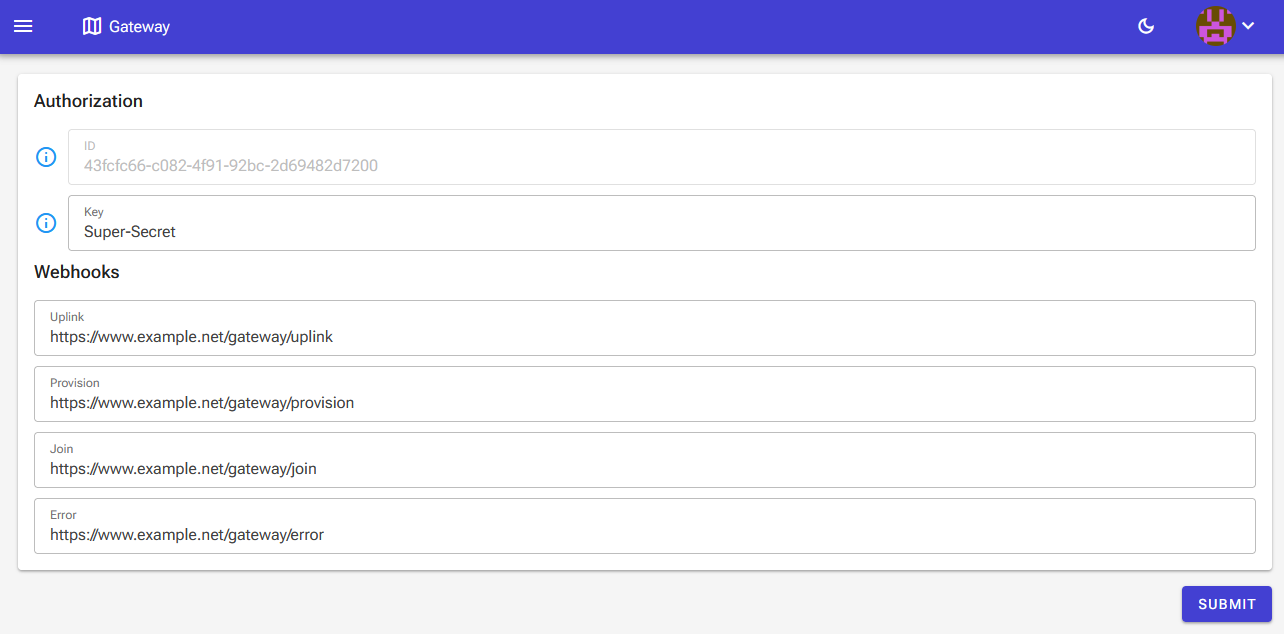
To implement authorization, applications should verify the following HTTP headers included in every request:
Ada-Integration: The assigned integration identifier.Ada-Key: The secret key specified in the configuration interface.
Endpoints must use absolute URLs, HTTPS, and a certificate signed by a valid Certificate Authority (CA).
Webhooks
Uplink
Uplink messages are delivered as POST requests containing a JSON body with network metadata and a device-specific payload.
Once a message is received by the network server, it is forwarded to the Ada Gateway and relayed to the configured integration endpoint.
The receiving server must respond within 5 seconds to avoid a timeout; otherwise, the request will be retried three times with exponential backoff.
Due to these potential retries and possible gateway buffering during back-haul failures, applications should rely on the receivedTime field for accurate event sequencing.
Uplink payloads vary by device type, see the payloads documentation for more information.
Below is an example uplink request.
First the request headers used for authorization.
Field name | Type | Conditional | Description | Notes |
|---|---|---|---|---|
network | string | No | The network from which the message is received. | Possible values are: "ADA", "BABBAGE" and "CIBICOM" |
deviceId | string | No | A unique guid string representing a device. | |
reference | string | Yes | A reference field which can be set programatically through the API. | |
deviceType | string | No | The device type the message originated from. | See specific device documentation. |
receivedTime | string | No | UTC timestamp indicating the time the message was received by the network. | This value may differ significantly from the "nsReceivedTime" since the gateways can buffer messages in certain circumstances, such as a back-haul failure. |
processedTime | string | No | UTC timestamp indicating the time the message was processed by the Ada Gateway. | |
signalQuality | string | No | A string describing the signal quality. | Possible values are: "Poor", "Moderate", "Good" and "Excellent" |
payload | object | Yes | Object containing decoded payload data. | Contents of the payload object depends on the device type. |
Example Implementation
The following C# example (.NET 6+) demonstrates how to handle 'Click' device uplinks using the built-in JSON serializer.
First we define the Uplink request model.
In the controller we define a post endpoint which accepts an UplinkRequest object. The DeviceType field is used to determine how to deserialize the payload.
The Click payload model declares two properties, button and battery. Since not every request will contain both values the properties are declared as nullable.
Provision
The Gateway notifies applications when a device is provisioned and registered to an integration via the "Provision event" webhook.
Below is an example provision request
Field name | Type | Conditional | Description | Notes |
|---|---|---|---|---|
network | string | No | The network on which the device has been provisioned. | |
deviceId | string | No | A unique guid representing a device. | |
deviceName | string | No | A generated friendly device name. | This is only used for convenience and can be ignored in all device communications. |
deviceType | string | No | The type of the new device. | See device documentation. |
devicePin | string | No | A unique device pin. | Not used during device communication, but can be used for implementing device claiming. |
Example implementation
The following is an example implementation for a 'Click' device written in C# for .NET 6+ using the built-in JSON serializer (controllers, using and namespaces omitted for brevity).
First we define the provision request model.
In the controller we define a post endpoint which accepts an ProvisionModel object.
Join notifications
Applications can be notified when devices join the network. This is done by implementing the 'Join event' webhook in the configuration webinterface.
Documentation still in preparation...
Error notifications
Applications can be notified when a device communication error occurs. This is done by implementing the 'Error event' webhook in the configuration webinterface.
Documentation still in preparation...
Downlink messages
Downlink messages are sent via the Gateway API, typically to configure device parameters.
Note: Some technologies (e.g., LoRaWAN) have limited downlink capacity due to regional frequency regulations.
To queue a downlink, send a POST request with authorization headers to:
/Devices/{ID}/Downlink (where {ID} is the device GUID).
Field name | Type | Conditional | Description |
|---|---|---|---|
confirmed | Boolean | No | Indicates whether the downlink should be confirmed. |
port | Number | No | The network port on which the downlink should be sent. The significance of the port depends on the device. |
payload | Object | No | An object containing the payload to be sent to the device. The payload specifications can be found in the device sections. |
Documentation still in preparation...
MQTT
The Ada MQTT adapter is a standalone C# application (compatible with Windows and Linux) that converts Ada webhooks into MQTT topics and forwards them to a broker.
Configuration
Host the adapter on any server meeting the network requirements described in the Uplink section.
Configure the adapter by placing a config.json file in /usr/share/AdaMQTT (Linux):
The document should contain the following fields:
You can transform payloads using JavaScript scripts. The incoming request is available via the uplink variable.